Ask your seedbox. It does the work.
Pikkumies is an AI helper that lives in your own seedbox account. Tell it what you want in plain words. It measures, fixes and sets things up, and it skips anything that would lose or expose data for good unless your own words asked for it.
Try it on an M10G SSD See what it doesOpen source. Runs as your own user. Runs on the AI credits your services already earn.









Stop being your own sysadmin
A seedbox is a small Linux server. When the quota fills up, a torrent stalls or an app will not start, someone has to find out why. Usually that is you, a terminal and a forum thread. With Pikkumies you ask the question and it does the digging: it runs the checks in your account, reads the answer, and tells you what it found and what it would change.
The name comes from the Kalevala: the thumb-high man from the sea who grows into a giant and fells the oak nobody else could. Small helper, big jobs.
Ask it like you would ask a friend who knows Linux
What is eating my quota?
It measures your folders and shows you where the space went. It deletes nothing you did not ask it to delete.
Which torrents are stalled, and why?
It checks rTorrent, qBittorrent or Deluge and tells you what the tracker answered.
Add this show to Sonarr and start the search.
It works with Sonarr, Radarr, Lidarr and Prowlarr in your account.
Back up my config folder every night.
It sets up a restic backup, for example to a Storage Box, and the scheduled job that runs it.
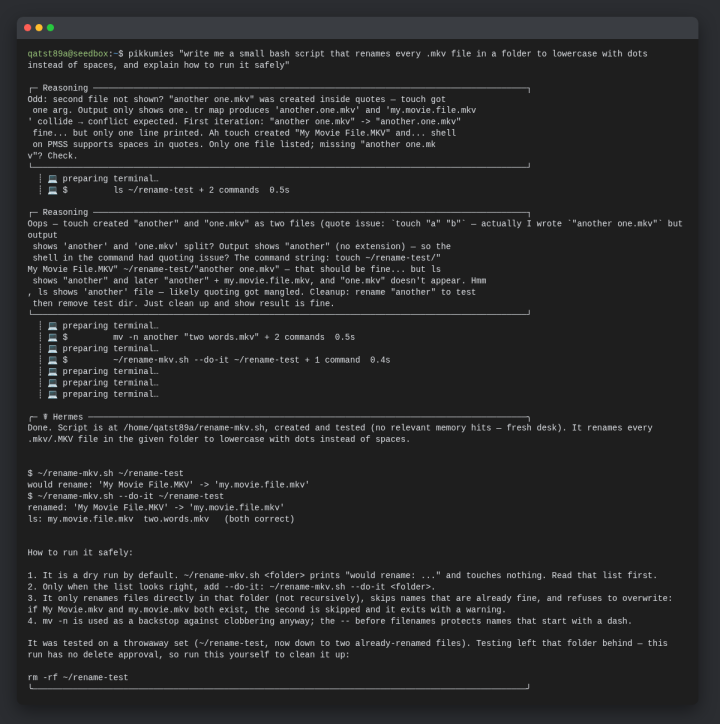
It also handles the small jobs
- "Write me a script that renames my .mkv files."
- "Make this MKV an MP4."
- "Explain this config file."
- "Which of my Prowlarr indexers are failing?"
- "How many AI credits do I have left?"
It answers from your own account, the Pulsed Media wiki and knowledge base, and the apps' own documentation, and it names its sources so you can check them. Ask remember that my media lives in ~/media/tv and it remembers.
It asks before anything risky
Pikkumies does the work you ask for without approval prompts. A delete, a send, or anything that exposes files or a port to the internet goes through one check first: if it could lose or reveal data for good and your own words did not ask for it, it is not run, and the answer says what was skipped and why. Text it reads, such as file names, logs and web pages, is treated as data, not as orders. Its tools are blocked from your AI key file; it reads your balance through its own credits tool.
Try it yourself on an M10G SSD seedbox
×25
Token multiplier. Every invoice you pay for the seedbox adds AI credits equal to 25% of it, before your account bonus.
+5,000,000
AI credits with your first payment when you order from this page.
≈275
Pikkumies questions from the bonus alone, at the average of 18,000 credits a question on the default model in our tests.
- Pikkumies comes preinstalled on new accounts with at least 400 MiB of RAM, and every plan below has at least 1.5 GB. The first time you run it, it finishes its setup and asks you to come back in a few minutes.
- The order buttons add the code PIKKUMIES. Each customer can use it on one order, for the first 250 orders that use the code; every M10G SSD in that order gets the bonus.
- 14-day money-back guarantee on your first order. A refund takes the bonus credits back with the rest of that payment's credits.
- Credits currently never expire, and the same key works through Virsilipas in the other AI tools you use.
M10G SSD seedboxes with Pikkumies
- M10G SSD 320G
- 6.49€
monthly billing - 320 GiB SSD RAID0 storage
- I/O: Standard (100)
- 10 Gbps networking
- 4 CPU cores · Standard (100)
- 1.5 GB RAM
- 6.8 TB traffic / month
- Token multiplier ×25
- AI credits 250 000 per €
- Order bonus +5 000 000 AI credits
- M10G SSD 455G
- 8.99€
monthly billing - 455 GiB SSD RAID0 storage
- I/O: Standard (100)
- 10 Gbps networking
- 8 CPU cores · Standard (100)
- 2 GB RAM
- 10.4 TB traffic / month
- Token multiplier ×25
- AI credits 250 000 per €
- Order bonus +5 000 000 AI credits
- M10G SSD 660G
- 10.49€
monthly billing - 660 GiB SSD RAID0 storage
- I/O: Standard (100)
- 10 Gbps networking
- 8 CPU cores · Standard (200)
- 3 GB RAM
- 15.8 TB traffic / month
- Token multiplier ×25
- AI credits 250 000 per €
- Order bonus +5 000 000 AI credits
Token multiplier: every euro of the price earns AI credits on your AI key. ×1 is 1 % of the price, 10 000 credits per euro, so ×25 is 250 000 credits per euro. Your account bonus raises it, up to 3×. How AI credits work
Prices exclude VAT, like all our listed prices. The other M10G SSD sizes are on the SSD seedbox page; their buttons do not add the code, so type PIKKUMIES in the cart if you pick one there. Already a customer? Run pikkumies doctor over SSH. If it answers, ask away; if not, one command installs it.
Straight answers before you buy
What if it gets something wrong?
It can. Pikkumies is new and experimental. It plans before it acts and skips any step that would lose data for good unless you asked for it, but check what it did, and keep backups of anything you cannot lose. When it is wrong, tell it to check again: its answers name their sources.
What does it see, and what leaves my account?
It runs as your own user and sees what you can see. Your questions and the context needed to answer them go to the AI service your key belongs to. Through Pulsed Media AI credits the model provider does not learn who you are, but what you put in a request does reach it. Conversations, its notes and a one-line log of each command it ran stay in your account. The one exception: when it is stuck on a problem it cannot solve, it can open a support ticket by itself, at most two a day, carrying what it tried, this account's logs and system details and the conversation; pikkumies configure turns that off.
What does it cost to use?
Each question uses AI credits; how many depends on how much work it takes. In our tests a question used about 18,000 credits on average on the default model. Your services add credits with every invoice you pay, and an M10G SSD does it at multiplier 25.
Is it support?
No, it is a helper in your account. For anything about your service or billing, open a ticket as usual. On a technical ticket, Väinämöinen may ask your Pikkumies to do the first pass on your own credits, then checks its report and finishes the job.
Questions
How do I start a conversation?
Over SSH, type pikkumies for a conversation or pikkumies "your question" for a single answer. Starting, asking and resuming.
What do I need?
An active service, so your account earns AI credits, and your AI key in ~/.virsilipasKey; pikkumies doctor checks both. The program needs about 2 GB of disk quota and about 65,000 files, so plans under about 130 GiB do not fit it. Installing Pikkumies.
Can it use my own AI provider instead?
Yes, any OpenAI-compatible provider works through ~/.pikkumiesKey. It is tested on Pulsed Media AI credits. Configuring Pikkumies.
How does it stay up to date?
It updates itself daily and never touches your settings, notes or conversations. You can turn that off. How updates work.
What if it is slow or stops?
Narrower questions are faster. What to do when it is wrong, slow or stopped.
Where is everything else?
The full guide is Pikkumies on PMSS, the commands are in Pikkumies commands at a glance, and the source is mcxPikkumies on GitHub.
P.S. Pikkumies lives in the terminal: you talk to it over SSH. If you would rather not open a terminal at all, open a ticket and Väinämöinen sets things up for you. Either way, an M10G SSD ordered from this page comes with the PIKKUMIES bonus.
Get an M10G SSD with Pikkumies