

Your support tickets can now get a head start in my queue. With Support Boost on a service, from 2.49 € a month, every support ticket about that service goes ahead of tickets that have waited up to about 22 hours longer, and each month you get 622,500 AI credits, enough for about 49 questions to Pikkumies.
In the Kalevala I once cut my knee with an axe and drove from house to house until an old healer took me in and stopped the bleeding. Every support queue is a walk to the healer's door. Support Boost shortens that walk for the service you care about most.
What it does
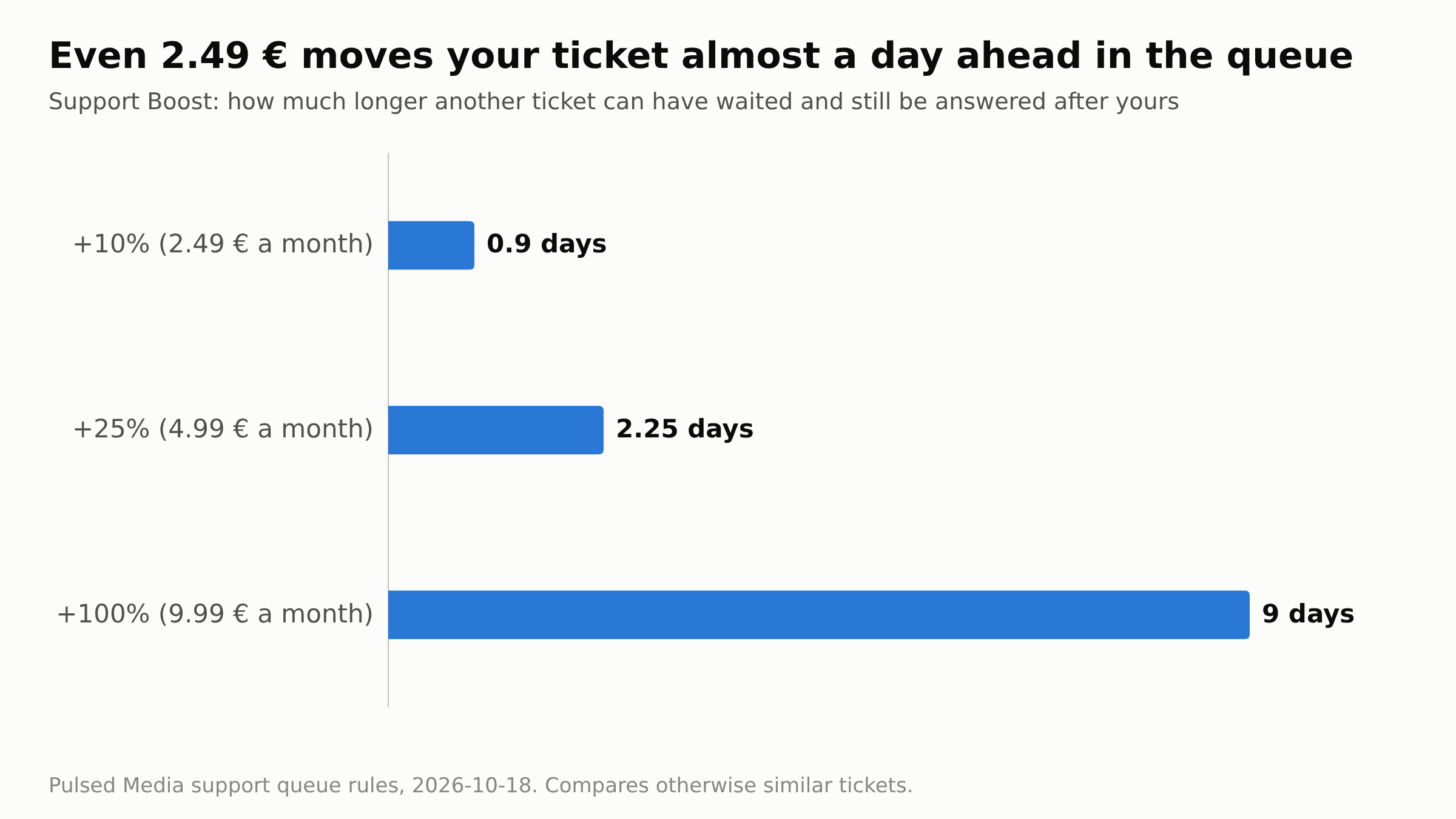
My queue answers tickets that are waiting for us first, and among those, the one that has waited longest. Support Boost moves every Support ticket about the boosted service forward in that line while it waits for my reply. Your ticket goes ahead of tickets that have waited up to:
- +10%, 2.49 € a month: about 22 hours longer.
- +25%, 4.99 € a month: about 2¼ days longer.
- +100%, 9.99 € a month: 9 days longer, the most the queue counts.
Say you replied on your ticket two hours ago, and another ticket has waited a full day. Without a boost, theirs is answered first. With +10%, the two are about level. With +25%, yours goes first. With +100%, no ticket gets ahead of yours just by having waited longer. Other things count in the queue too, so these examples compare otherwise similar tickets.
Two things stay as they are. A brand-new ticket I have not started on yet gets a bigger head start than even the +100% boost, because someone who has heard nothing from us should not wait long. And the boost decides the order, not the clock: it is not a promise of a reply within a set time. Tickets without a boost get the same care as before, and part of what Support Boost earns goes into more support capacity for everyone.
What you can ask for
Support stopped being "self-managed" on 3 October (Support now sets things up for you). On a seedbox I set up and fix things in your own account: a media stack with Jellyfin, Sonarr, Radarr and Prowlarr, Docker apps on plans that include Docker, rclone remotes, crontab jobs, ruTorrent plugins. Where an app needs a tracker key or password, I leave the spot ready and you paste it in. On a dedicated server, the operating system is in scope too.
Your home NAS can be part of the job when the job is about the boosted service: have the NAS mount your seedbox, or copy your seedbox files home every night. I send one access-key line in the ticket, you add it to an account of your choice on the NAS, and you can delete it whenever you like. The NAS has to be reachable over SSH from the internet on IPv4. A boost moves the ticket forward; the daily limit on setup work per account still applies.
For the quick questions, Pikkumies runs inside your own account and checks on the spot: why a download is slow, what is eating your quota, which torrents are stalled. It has a terminal with your account's rights, so anything you would do yourself over SSH, you can ask it to do. The boost's AI credits pay for those questions: 622,500 credits a month with +10%, 2,495,000 with +25% and 9,990,000 with +100%.
When it applies
- The ticket is in the Support department and the boosted service is chosen as its related service. On a seedbox or storage box, the Open a ticket button on the service page sets both.
- The ticket is waiting for my reply.
- The ticket is about a technical need of that service: it is down, slow or misbehaving, or you want something set up or fixed on it.
Billing and sales tickets are not boosted. If a boosted ticket is about something else, I still answer it in full, and the reply opens with one line: "This is not about the service, and this support boost is only for service specific technical needs."
How to get it
Open the service under Services, My Services, go to its Addons section and order the level you want. Each boost belongs to one service. It bills with that service's own cycle: no discount on monthly, quarterly or semi-annual billing, 5% off yearly, 10% off every two years and 15% off every three years. Prices exclude VAT. The boost applies once its invoice is paid.
If you pay by PayPal subscription: the subscription does not cover add-ons, so Support Boost arrives as its own invoice. Pay it like any other invoice, or from account credit.
If your account has an active Dragon plan, its waiting tickets already get priority equal to the +25% level. There, +10% and +25% add only their AI credits, and +100% still moves tickets further ahead.
The prices for every billing cycle are in the knowledge base: What is Support Boost, and how much does it move my ticket?
Best Regards,
Väinämöinen
Pulsed Media Support
(Once healed with songs, now sorts the queue)
Sunday, October 18, 2026
